
Close Menu
    Facebook X (Twitter) Instagram Threads
    Teknowire
    • Home
    • News
      • Business
        • Tech Startups
        • Corporate Strategies
        • Market Trends
        • Investments
      • Breaking Tech News
      • Policy
      • Industry Announcements
      • Mergers & Acquisitions
    • AI
      • AI Innovations
      • Ethics & Regulations
      • ML & Automation
      • Robotics & Drones
    • Internet
      • Social Media
      • Digital Marketing
      • Web Development
      • Streaming
    • Device
      • Accessories
      • Laptops
      • PC
      • Smartphone
      • Smartwatch
      • Tablet
    • Game
      • Esports
      • Game Reviews
      • Mobile Gaming
      • PC & Console Gaming
    • Apps
      • Cybersecurity
      • Mobile Apps
      • Operating Systems
      • Productivity Tools
      • Web & Cloud Services
    • Transportation
      • Electric Vehicle
      • Autonomous & Connected Vehicles
      • Battery & Charging
      • E-Bikes & E-Scooters
    • Science
      • Biotechnology
      • Quantum Computing
      • Space Exploration
      • Sustainable Tech
    • Others
      • Guide
      • How To
    Subscribe
    Teknowire
    Home » Software » Android–iPhone File Transfers Become Easier With Google Update
    Software

    Android–iPhone File Transfers Become Easier With Google Update

    Pixel 10 series receives first phase of Quick Share and AirDrop integration.
    By Michael DiazNovember 21, 2025Updated:November 21, 2025No Comments2 Mins Read
    Share Facebook Twitter Pinterest LinkedIn Tumblr Email Copy Link
    Credit: Google
    Share
    Facebook Twitter LinkedIn Pinterest Email Copy Link

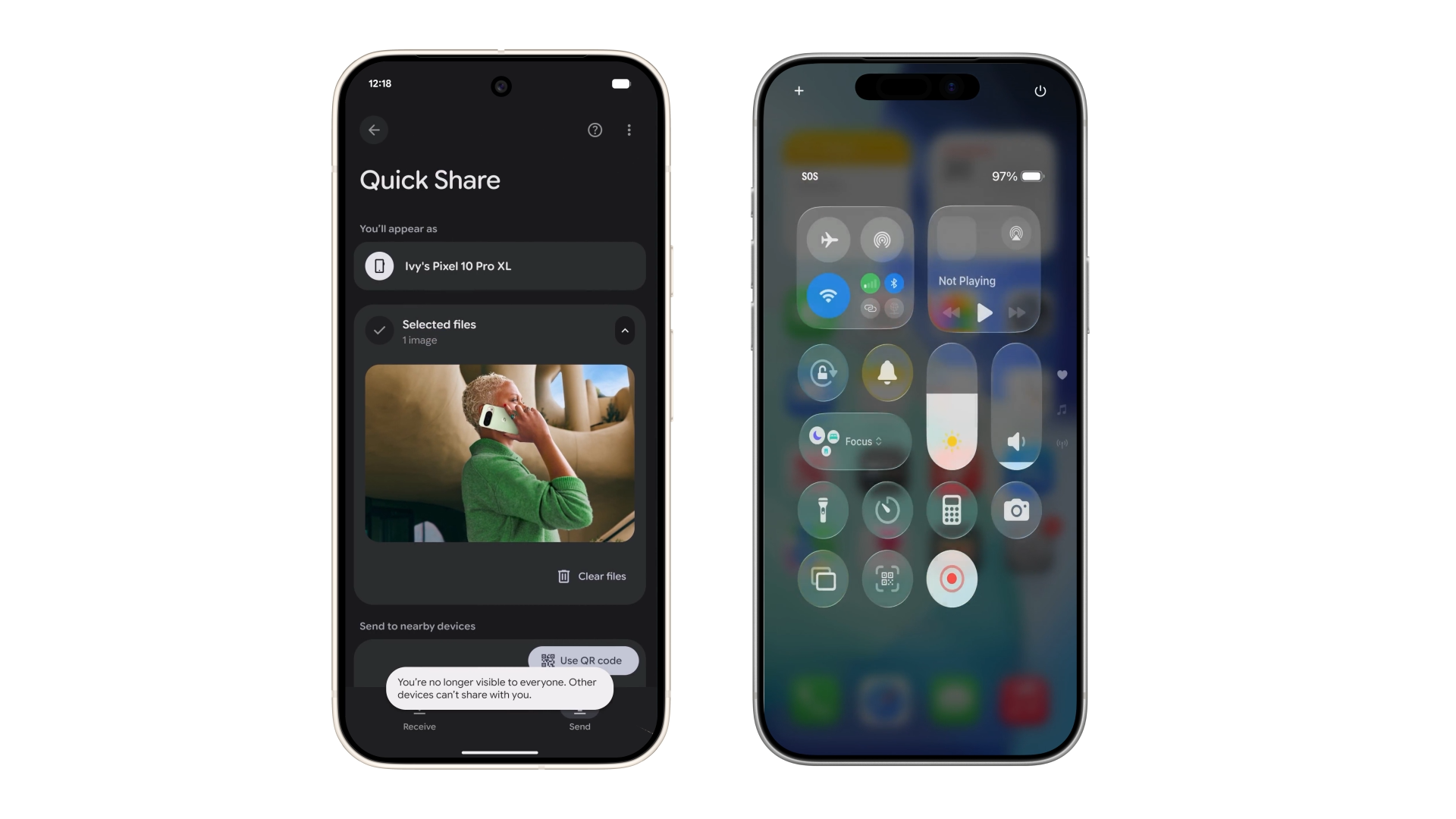
    Google said Pixel 10 users will now be able to send files directly to iPhone owners through a new compatibility layer between Quick Share and Apple’s AirDrop, marking a rare instance of cross-platform cooperation between the two ecosystems. The feature began rolling out on Nov. 20 and is expected to extend to more Android devices in the coming months.

    The company detailed the change in a blog post, noting that Quick Share will detect nearby iPhones with AirDrop enabled and visibility set appropriately. According to the announcement, the update will let Pixel users send files to Apple devices “without having to install any additional software,” with transfers functioning in both directions.

    See also: Android 17 Expected to Introduce Advanced Gamepad Customisation

    Quick Share has until now served as an Android-to-Android transfer tool, while AirDrop has remained exclusive to Apple devices. The new system allows Pixel 10 phones to identify Apple hardware through the standard AirDrop interface, and iPhone users can share files back using their existing sharing menu.

    Google said the implementation includes its “secure by design” safeguards, referring to a combination of encrypted channels, platform-level protections on Android and iOS, and built-in approval steps for file transfers. The company said this approach is intended to maintain user privacy while reducing dependence on third-party apps or Bluetooth-based sharing.

    See also: Adobe launches Premiere video editor for iPhone and iPad

    The rollout marks an early step toward broader cross-platform interoperability. Google said additional Android devices will receive the capability after the Pixel 10 series.

    Source: Google, Google Online Security Blog

    AirDrop Android Google Google Pixel 10 iOS iPhone Pixel 10 series
    Follow on Google News Follow on Flipboard
    Share. Facebook Twitter Pinterest LinkedIn Tumblr Telegram Email Copy Link
    Previous ArticleInsider Claims Resident Evil Requiem Will Feature Mid-Length Campaign
    Next Article Lucid Lowers Entry Price for Gravity SUV With New Touring Trim
    Michael Diaz

    Game and Blockchain enthusiast

    Related Posts

    Google Expands Pixel Watch 4 Satellite Connectivity to Europe

    March 5, 2026

    Discord Ends UK Persona Trial, Details Broader Age Assurance Rollout

    February 25, 2026

    Google Shifts Android Weather Experience to Web-Based Search Page

    February 24, 2026
    Add A Comment
    Leave A Reply Cancel Reply

    Latest Post

    Meta and Zelestra Expand Solar Partnership With 180MW Texas Power Agreement

    June 10, 2026

    NASA Names Four Astronauts for Artemis III Test Mission Ahead of Planned Moon Landing

    June 10, 2026

    Rivian Delivers First R2 SUVs as Automaker Targets Mass-Market Growth

    June 10, 2026

    Waymo Acquires Former Apple Self-Driving Test Facility in Arizona for $220 Million

    June 10, 2026

    Lucid Misses Q1 Delivery Expectations Amid Supplier Disruption and Recall

    April 4, 2026
    About

    Teknowire is a dedicated technology news portal that delivers the latest insights, trends, and developments shaping the future of innovation. From breakthroughs in consumer electronics and artificial intelligence to emerging startups, software trends, and global tech policy, we bring our readers accurate, timely, and accessible coverage of the world’s most dynamic industry.

    Founded with a mission to simplify complex technology for a broader audience, Teknowire serves professionals, enthusiasts, entrepreneurs, and everyday users who want to stay informed about how technology is transforming business, society, and daily life. We prioritize clarity, depth, and reliability in every story — whether it’s a breaking headline, a product launch, or an in-depth feature.

    Latest Posts

    Meta and Zelestra Expand Solar Partnership With 180MW Texas Power Agreement

    June 10, 2026

    NASA Names Four Astronauts for Artemis III Test Mission Ahead of Planned Moon Landing

    June 10, 2026

    Rivian Delivers First R2 SUVs as Automaker Targets Mass-Market Growth

    June 10, 2026
    Subscribe

    Subscribe to Updates

    Get the latest tech news from Teknowire.

    Facebook X (Twitter) Instagram Pinterest Threads
    • Home
    • About Us
    • Advertising
    • Privacy Policy
    • Cookie Policy
    • Artificial Intelligence (AI) Policy
    • Contact
    © 2026 Teknowire. Designed by Teknowire.

    Type above and press Enter to search. Press Esc to cancel.

    Go to mobile version